 Brainerce Help
VIP tiers
A membership ladder of Bronze, Silver and Gold, where higher tiers earn points faster and unlock exclusive rewards.
⛔ You cannot set this up yet. Loyalty has not been released to stores, so there is no Loyalty entry in your sidebar and none of the screens below exist for you today. This describes how it will work once it ships. See what Brainerce does not do.
Tiers turn your program into a ladder worth climbing: the more a customer spends, the faster they earn, and the more rewards they unlock.
How tiers work
Each tier has:
- Level is its position on the ladder (higher = better).
- Points multiplier:
1.5×means Gold members earn 50% more points on every order. - Qualification is a spend amount (or points total) the customer must reach within a rolling window (365 days by default;
0= lifetime, never resets).
Tier assignments are recalculated automatically every night: customers who qualified move up, and customers whose rolling window no longer qualifies move down. Use Recalculate now (in the Members tab) after changing thresholds to apply immediately.
What "spend" means here: the full order total, VAT and shipping included
Tier qualification does not use the same number your points economy uses, and the difference catches merchants out.
| Money on the order | Counts toward a tier | Counts toward points |
|---|---|---|
| Item value after discounts | Yes | Yes |
| Shipping charged | Yes | No (by default) |
| VAT / sales tax | Yes | No (by default) |
- A spend tier counts the full order total the customer paid: merchandise, shipping and VAT together. Only orders that were actually paid count; cancelled, refunded and test orders are excluded, and a refund therefore removes that order from the customer's qualification on the next nightly run.
- A points tier counts only confirmed points. Points still sitting in the pending window do not count toward a tier yet, so a customer can be a few days away from a tier they look like they already qualify for.
The practical effect of the first row: a customer climbs tiers slightly faster than their points balance suggests, because shipping and VAT push their tier total up but earn them nothing. If you quote both numbers to customers, quote them separately, because "$900 spent" and "900 points" are not the same money. See Points & rewards for the earning side.
Demotion is immediate, with no grace period
When a customer's rolling window stops qualifying, they are dropped that same night. There is no grace period, no buffer, and no warning. The nightly job recomputes every member from scratch and removes any tier that no longer qualifies.
This is the setting most worth being conservative about. A short qualification window (say 90 days) will visibly demote genuinely loyal customers who simply had a quiet quarter, and they lose the multiplier and any tier-gated rewards the moment it happens. A 365-day window, or 0 for lifetime tiers that never reset, avoids the problem entirely. Nothing tells the customer it happened, so the first they know of it is a missing badge or a reward they can no longer redeem.
Setting up a ladder
Open Customers → Loyalty → Tiers → Add tier. A proven starting shape:
| Tier | Qualification (365-day spend) | Multiplier |
|---|---|---|
| Bronze | Everyone starts here | 1× |
| Silver | $300 | 1.2× |
| Gold | $900 | 1.5× |
Those qualification figures are full order totals including shipping and VAT, counted only from paid orders (cancelled and refunded ones drop out). They are not the same basis your points are earned on, so set them with that in mind.
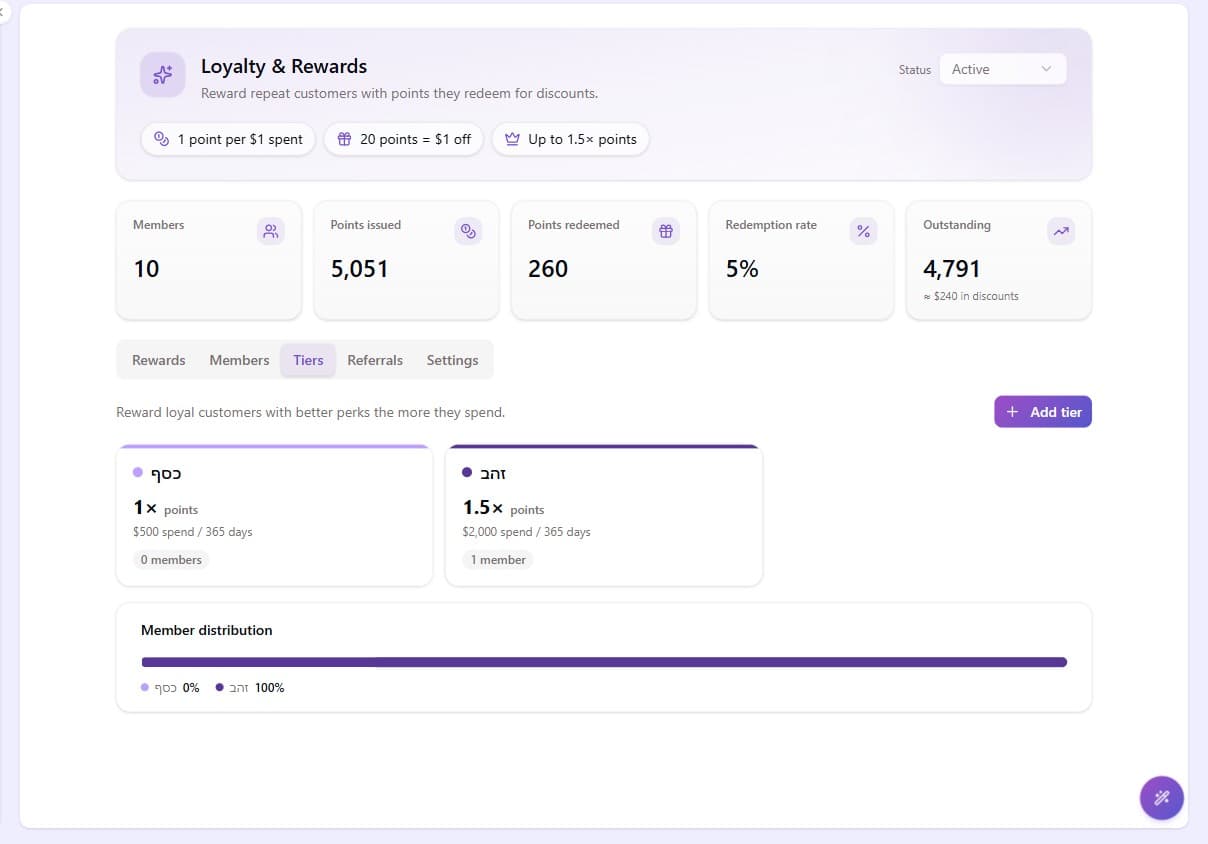
The Tiers tab shows each tier as a card with its member count, plus a member distribution bar. If 90% of members sit in your top tier, thresholds are too easy; if the top tier is empty after months, they're too hard.
Tier-exclusive rewards
In the reward form, set Minimum tier to gate a reward, for example a "Free shipping" reward only Gold members can redeem. Customers below the tier see what they're missing, which is exactly the point.
What customers see
If your storefront integrates the loyalty SDK, customers see their current tier, the next tier, and a progress bar toward it, the single most motivating element of a tier system. The Members tab shows the same progress per member.
If your storefront does not show it, customers see nothing at all, because tiers are never announced by email. Brainerce sends no tier-promotion notice ("you've reached Gold"), no demotion notice, and no reminder that a customer is close to the next tier. Reaching Gold and dropping out of Gold are both completely silent events; the only loyalty email the programme sends is the birthday gift.
That makes the storefront integration the whole visible surface of your tier system. Without it a customer can be promoted, enjoy a 1.5× multiplier for months, be demoted, and never know any of it happened, which is exactly as motivating as it sounds. If you want the moment celebrated, send it yourself as an email campaign to the members in that tier.