 Brainerce Help
Loyalty & Rewards
A built-in points program where customers earn points on every purchase and redeem them for discounts. Tiers, bonuses, referrals, and birthday gifts included.
⛔ Loyalty is not switched on for stores yet, so you cannot set this up today. It is built and finished, but it has not been released, which means there is no Loyalty entry in your sidebar, no Customers → Loyalty page you can open, and no Activate loyalty program button to press. Everything in this article and the ones below it describes how the programme works once it ships, so you can plan for it. It is not a page you have failed to find. To reward customers today, use coupons instead. See what Brainerce does not do.
Loyalty & Rewards is Brainerce's built-in points program. Customers earn points on every storefront purchase and redeem them for discounts you define, with no third-party app and no monthly add-on fee. Once released it lives under Customers → Loyalty.
Why run a loyalty program
- Repeat purchases. Points waiting in an account are a reason to come back to your store instead of a competitor.
- Bigger baskets. Customers close to a reward (or a VIP tier) spend more to get there.
- Word of mouth. The referral program turns happy customers into a sales channel, with fraud protection built in.
- A reason to register. Guests become account holders, which means email marketing, order history, and better data.
In 30 seconds, once loyalty ships: open Customers → Loyalty and click Activate loyalty program. It starts live with sensible defaults: 1 point per $1 spent, 20 points = $1 off (≈ 5% back), plus three starter rewards ($5, $10 and $25 off) so customers have something to redeem from the first minute. Fine-tune everything later in the Settings tab, and edit or delete the starter rewards like any other. You cannot do this yet: loyalty has not been released to stores, so that page and that button do not exist for you today.
How it works, end to end
- Customers earn points automatically when they pay for an order, and you never grant purchase points by hand. Points are earned on the merchandise subtotal after discounts, before shipping and before VAT.
- New points are held as "pending" through your return window (14 days by default), then confirmed and become spendable. If the order is cancelled or refunded, the points are taken back automatically.
- Customers redeem points for rewards you define. Each redemption mints a one-time coupon, locked to that customer, that applies at checkout like any other coupon and never expires.
- Optional layers on top: VIP tiers that earn faster, bonus actions (joining, reviewing, sharing), a referral program, and birthday gifts.
None of those steps emails the customer. The birthday gift is the only email the loyalty programme sends: there is no points-earned, points-expiring, reward-available or tier-promotion notice. Between purchases the programme is visible to customers only if your storefront displays it.
The dashboard at a glance
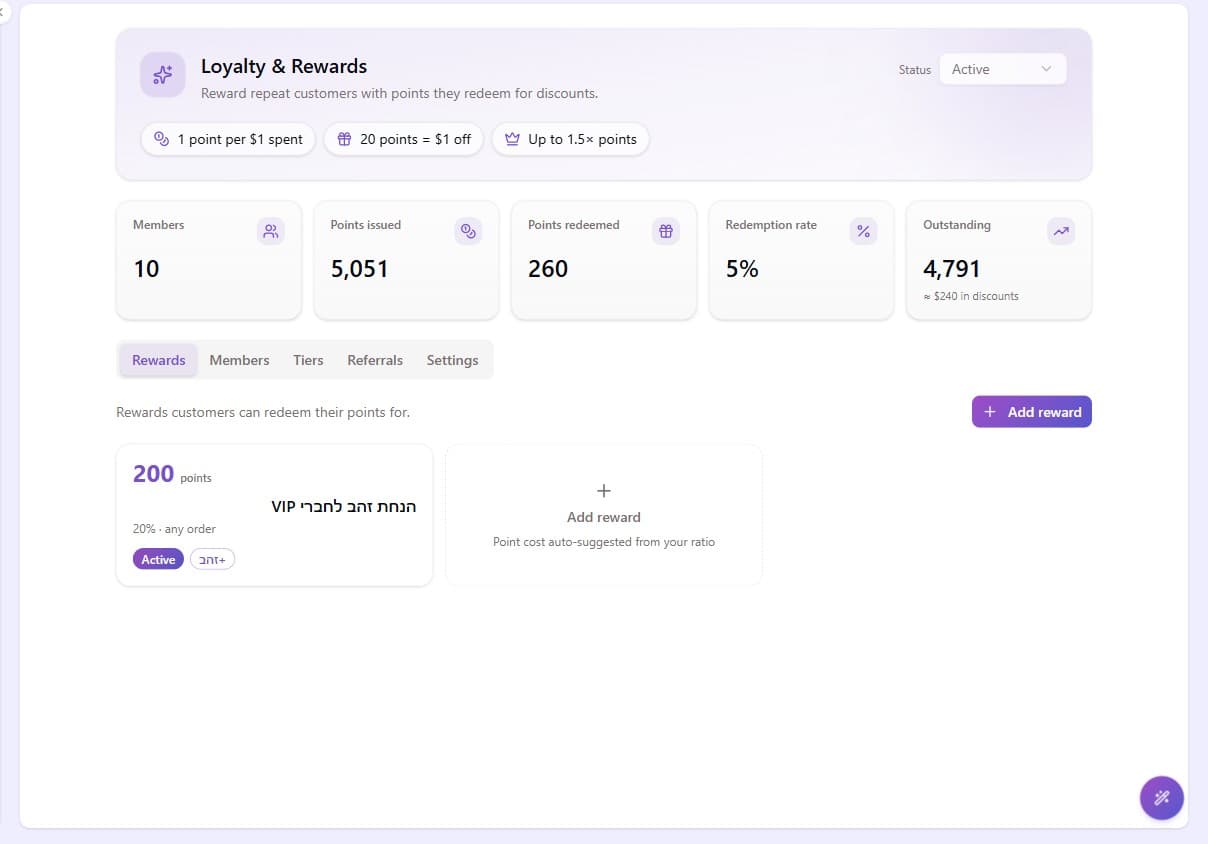
The Loyalty page opens with a program header (status control + your earn/redeem rates) and a KPI band: members, points issued, points redeemed, redemption rate, and outstanding points with their approximate value in discounts. Below it, seven tabs:
| Tab | What you do there |
|---|---|
| Rewards | The catalog customers redeem points for. Create, edit, deactivate. |
| Members | Every enrolled customer: balance, tier, full points ledger, manual adjustments. |
| Tiers | The VIP ladder: levels, earn multipliers, qualification thresholds. |
| Referrals | The referral funnel and every referral, including fraud flags and manual rejection. |
| Paid plans | A recurring paid membership with a points multiplier that stacks on earned tiers. |
| Analytics | Points issued and redeemed over time, members by tier, and your most-redeemed rewards. |
| Settings | The whole program configuration: economics, bonuses, referrals, birthdays. |
In this section
- Points & rewards covers the earning economics, the pending window, and building your reward catalog.
- VIP tiers reward your best customers with faster earning.
- Engagement bonuses give points for joining, reviewing, and sharing.
- Referral program covers share codes, friend rewards, and the fraud-review queue.
- Birthday gifts send an automatic gift coupon ahead of each customer's birthday.
Paid plans, Analytics and Milestone badges
Paid plans
A recurring paid membership. Customers pay a fee on a billing cycle you set, and get a points multiplier that stacks on top of whatever tier they've earned. Subscriptions are charged automatically against saved cards. It has its own tab on the Loyalty page.
Analytics
Points issued and redeemed over time, members by tier, the referral funnel, and your most-redeemed rewards, over 30, 90 or 365 days. This is where you find out whether the programme costs what you assumed. It has its own tab on the Loyalty page.
Milestone badges
Display-only awards earned at thresholds of order count, lifetime spend, referrals, or reviews. They carry no discount; they exist to be shown off.
Badges are not a tab. They live at the bottom of the Rewards tab, which is where people go looking for them and don't find them.
The embeddable widget
At the bottom of Settings is a drop-in loyalty widget you can embed on any site. It shows a customer their points and lets them redeem, without you building that UI. Give it up to five allowed origins and copy the embed snippet.
It still needs one SDK call from your storefront to open a session, so it reduces the integration work rather than removing it.
Storefront requirement
Loyalty is not available to set up yet, so there is nothing to integrate today either; this is what your developer will need once it ships. Purchase points accrue on orders placed through your storefront's checkout. Orders you create by hand in the dashboard do not award points, so use a manual points adjustment on the customer if you need to credit one. The customer-facing surfaces (points balance, redeeming rewards, referral share links) need your storefront to integrate the loyalty SDK methods. Send your developer to the integration guide.